Progen FiveM Vehicles: Lore-Friendly Addon Cars
Progen on this page is three builds of the T20: the CTX, the CTX C2 and the FDR, all addon vehicles that stream in without touching the stock car. They are framework agnostic, so ESX, QBCore, Qbox or a standalone server can all reference the spawn names. Handling is tuned, and each car ships with its own addon sound and working tuning parts.
Products from this creator
3 products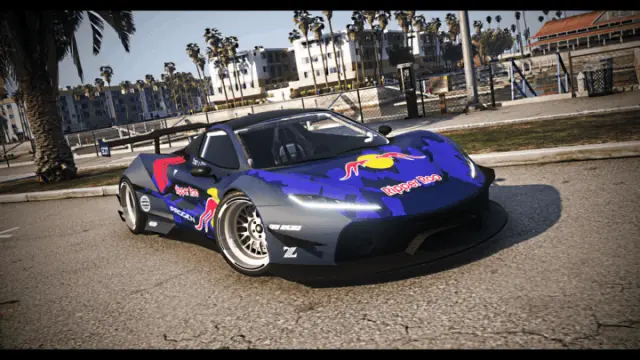
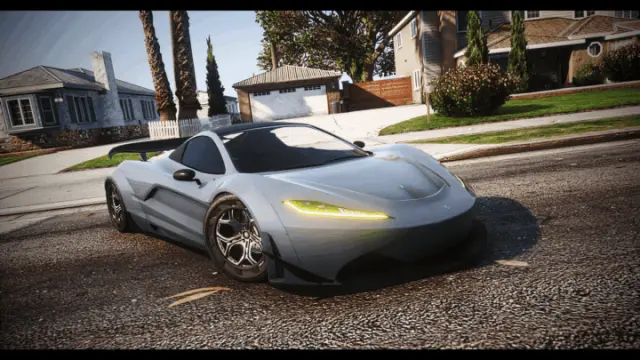
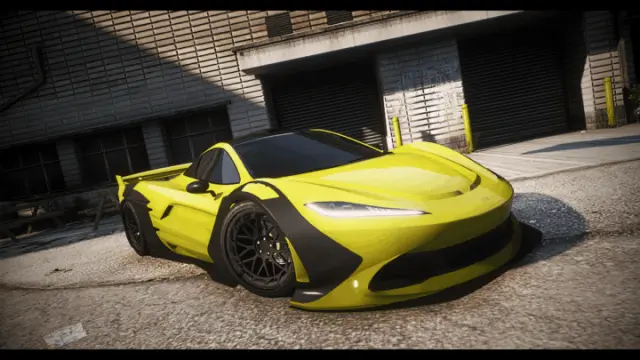
Progen here is a small, focused garage: three takes on the Progen T20, the T20 CTX, the T20 CTX C2, and the T20 FDR. All three keep the T20 shape you already know from base GTA and rework it with tuned handling and addon parts, so each build slots into a lore-friendly fleet instead of clashing with it.
Because these are addon cars rather than replaces, they stream in under their own spawn names and leave the stock T20 untouched. That matters on a live server: your dealership can list the CTX, the C2 and the FDR as separate vehicles, players can own more than one, and nothing you install here changes a car that is already sitting in someone's garage.
Signature work and style
The through-line is the T20. Rather than spreading across dozens of unrelated models, this catalog goes deep on one Progen chassis and ships three distinct variants of it. The CTX is the base of the trio, the CTX C2 reads as the sharper, track-leaning version, and the FDR is the third spin on the same platform. Handling is tuned rather than left on GTA defaults, so the weight, the grip and the top end feel deliberate instead of floaty.
Each build is addon-ready with tuning parts, so a player can take one into an LS Customs style menu and actually change something. The parts are wired up, not cosmetic dead ends. Addon sound is included too, which is the detail most bargain vehicle packs skip. A T20 that still runs a generic engine loop breaks immersion the second it drives past a mic, and giving it its own audio is what makes it read as a real car on the server rather than a reskin.
Compatibility & installation
These are standard FiveM addon vehicles, which means they are framework agnostic. Whether your server runs ESX, QBCore, Qbox or a mostly standalone setup, the car itself does not care. You wire the spawn name into whatever dealership, garage or admin menu you already use, and there is no framework lock baked into the model.
Installation is the usual addon flow. Drop the resource into your resources folder, add it to your server.cfg, and start the server. The spawn name then works anywhere you can reference a vehicle: a player-owned dealership, a job vehicle list, a shared garage, or a plain admin spawn for testing. Because the tuning parts and addon sound ship inside the resource, you do not have to hunt down extra audio or mod-kit files to get the full car. It all downloads as one package and is ready to stream.
If you already run other addon cars, adding a Progen build is the same short set of steps you have done before, and the instant download means you can have it on a test server within minutes of buying.
Why buy Progen vehicles here
The pull is having every Progen T20 build in one place instead of chasing the CTX on one store and the FDR on another. All three variants share the same lore-friendly approach, so buying the set gives you a coherent trio rather than three cars with mismatched quality and mismatched sound.
Instant download means no waiting on a delivery email or a manual approval before you can test. You get the files, you stream them, and you see the handling and audio on your own server in the same session. For a server owner deciding whether a car fits the vibe, that fast turnaround is worth more than any showroom screenshot.
If your server leans on the vanilla GTA fleet and you want addon cars that extend it without breaking the look, these T20 builds are made for exactly that job.